Why Companies Stay on EOL Node.js — Even When They Know the Risk

Legacy Node.js is rarely an awareness problem. It is a risk, cost, and uncertainty problem.
Last week, we looked at a striking signal in the official Node.js download data in Node.js Downloads Surge in 2026 as Node.js 24 Takes the Lead.
Node.js 24 had become the most downloaded Node.js release, a strong indication that modernization across the ecosystem is accelerating.
But something else stood out.
Node.js 20, which reached End-of-Life on April 30, 2026, still recorded more than 103 million downloads in July alone. Together, the already-EOL Node.js 18 and 20 release lines accounted for more than 136 million downloads that month.
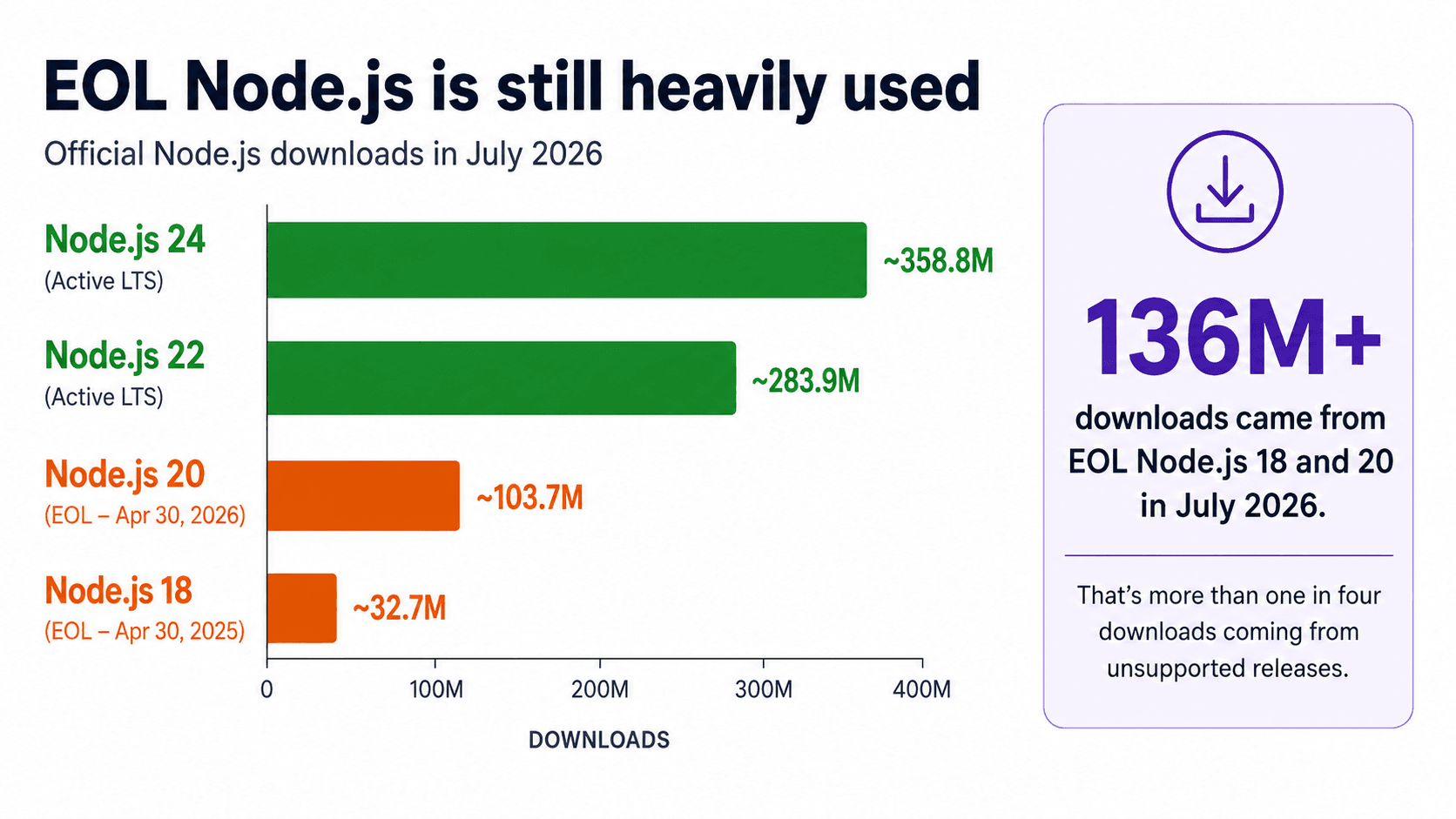
The obvious question was:
Why are so many organizations still running an unsupported runtime?
So we took the question to the community on LinkedIn — in a Spanish-language post — and the responses from developers and engineers pointed to a much more complicated reality.
They talked about applications that have been stable in production for years. Dependencies that may break. Base images that need to change. CI/CD pipelines that need to be revalidated. Regression testing, certifications, limited engineering capacity, and the simple reality that somebody has to take responsibility if an upgrade breaks checkout, billing, or another business-critical workflow.
One comment captured the organizational challenge particularly well: for a large application, a runtime migration is not simply an upgrade.
It is a project, with its own budget, timeline, validation requirements, and production risk.
Those responses matter because they expose something the Node.js community sometimes oversimplifies.
Companies are not necessarily staying on EOL Node.js because they do not know newer versions exist.
In many cases, they know exactly where they are.
The harder question is whether they believe changing it today is safer than leaving it alone.
Still running an End-of-Life version of Node.js?
Through the Node.js Upgrade Program, NodeSource helps organizations understand what is blocking their upgrade before changing the runtime.
Get your free Node.js Upgrade Assessment →
EOL Does Not Mean the Application Stops Working
This is the first misconception worth clearing up.
When Node.js 20 reached End-of-Life, applications running on Node.js 20 did not suddenly stop on April 30.
Servers kept accepting requests.
Containers kept starting.
APIs kept returning responses.
CI pipelines kept building.
That is precisely why EOL can be so easy to postpone.
End-of-Life describes the support state of the runtime, not the immediate operational state of your application.
The Node.js project is very clear about what changes after EOL: the release line no longer receives updates, including security fixes. Over time, teams can also encounter toolchain breakage, ecosystem drift as packages abandon old releases, and compliance problems associated with unsupported software.
So there are two statements that can simultaneously be true:
Our Node.js 20 application works perfectly today.
And:
Running it indefinitely creates increasing operational and security risk.
Understanding that distinction is essential.
Why “Just Upgrade Node.js” Is Bad Advice
On a development laptop, upgrading Node.js might look like this:
nvm install 24
nvm use 24
Production systems are different.
The runtime sits underneath an application dependency graph, build system, deployment infrastructure, operating system, container environment, observability stack, security controls, native modules, and years of accumulated technical decisions.
Changing Node.js can expose assumptions throughout that entire system.
This is why engineering teams resist advice that sounds like:
“Node.js 20 is EOL. Just move to Node.js 24.”
They know what the version number does not tell you.
1. The code change may be the cheapest part
A major runtime migration can surface incompatible dependencies, deprecated Node.js APIs, changes in V8 or OpenSSL behavior, native C/C++ addons that must be rebuilt, new compiler requirements, or packages whose maintainers never added support for newer Node.js versions.
Your own code may require very little modification.
Your dependency graph may require much more.
NodeSource's own Upgrade Discovery tooling focuses specifically on dependencies, native addons, static API usage, deprecated APIs, vulnerabilities, and other potential migration blockers for exactly this reason.
2. The Real Cost Is Often Validation
Developers frequently frame migrations in terms of how much code needs to change.
Organizations tend to think differently.
They ask:
- How much regression testing is required?
- Which critical workflows need manual validation?
- Do we need to rebuild deployment images?
- Will our third-party integrations continue working?
- Do our native modules compile correctly?
- Will performance characteristics change?
- What is our rollback strategy?
- Who owns the incident if something breaks?
For a checkout service processing millions of dollars in transactions, “the new version works on my machine” is not an acceptable migration strategy.
The more critical the system, the larger the validation surface becomes.
And that creates an uncomfortable paradox:
The applications that most need modernization are often the applications organizations are most afraid to change.
3. Stability Has Business Value
Engineers are trained to improve systems.
Businesses are trained to protect working systems.
Those goals usually align, but not always.
Imagine an internal service that:
- has operated reliably for five years,
- rarely receives feature changes,
- meets its SLA,
- generates no customer complaints,
- and runs on Node.js 20.
Now imagine asking the business for six weeks of engineering capacity to modernize it.
The first question probably will not be:
Which V8 version are we running?
It will be:
What happens if we don't do this?
That is a reasonable question.
Runtime upgrades compete against customer features, revenue projects, infrastructure work, reliability improvements, security initiatives, and every other item on an engineering roadmap.
Modernization therefore needs something developers sometimes overlook:
a business case.
4. Technical Debt Is Often Accepted Deliberately
Technical debt is not automatically a failure of engineering.
Sometimes organizations knowingly accept it.
They may decide that maintaining an older system for another six months is cheaper than migrating it immediately.
That can be a perfectly rational decision.
The problem begins when:
“We are intentionally postponing this upgrade until Q4.”
quietly becomes:
“Nobody has looked at this runtime in three years.”
Those are very different situations.
The first is risk management.
The second is unmanaged technical debt.
A mature organization does not necessarily upgrade every runtime the moment a newer release arrives.
But it should know:
- what versions are running,
- which versions are unsupported,
- what the exposure is,
- what is blocking modernization,
- who owns the decision,
- and when that decision will be revisited.
5. AI Can Reduce Upgrade Work. It Cannot Own Production Risk.
Another interesting theme in the discussion was AI.
Could Claude Code, Codex, or another coding agent make migration dramatically easier?
Absolutely.
AI can already accelerate parts of modernization:
- identify deprecated APIs,
- research dependency breaking changes,
- generate refactors,
- propose replacement packages,
- update configuration,
- generate tests,
- explain migration guides,
- and help developers investigate failures.
That changes the economics of modernization.
But there is an important distinction:
AI can reduce the cost of making changes. It does not eliminate the cost of proving those changes are safe.
An AI agent cannot take organizational responsibility for your production checkout.
It cannot decide whether your regression coverage is sufficient.
It cannot accept your compliance risk.
It cannot determine your maintenance window.
And it cannot own the incident if the migration fails.
The future of legacy modernization is therefore unlikely to be “AI upgrades everything automatically.”
It is more likely to be:
AI makes the engineering work dramatically faster while humans retain control of risk, validation, architecture, and production decisions.
That is a far more interesting—and useful—model.
The Real Problem Is Uncertainty
When engineering teams postpone Node.js upgrades, one factor appears repeatedly:
They do not know how large the migration actually is.
That uncertainty makes planning difficult.
Without inspecting the application, the conversation sounds like this:
“How hard would moving from Node.js 20 to a supported release be?”
“It depends.”
How many dependencies will break?
It depends.
Do we have native addons?
Maybe.
Do we use deprecated APIs?
Probably.
Will our build environment need changes?
Possibly.
How long will this take?
Two days?
Two weeks?
Three months?
When that is the level of confidence available to engineering leadership, delaying the project is predictable.
It is difficult to fund work that cannot be scoped.
That changes the upgrade problem entirely.
The first step should not necessarily be:
Upgrade the runtime.
It should be:
Reduce the uncertainty.
Turn the Upgrade Into a Measurable Engineering Project
This is one of the reasons NodeSource participates in the OpenJS Foundation's Node.js LTS Upgrade & Modernization program.
The program exists because the ecosystem recognizes that moving enterprise applications away from unsupported Node.js versions involves real challenges around dependencies, testing, architecture, and production stability—not simply developer awareness. The OpenJS Foundation describes the program as a way to connect organizations running legacy Node.js environments with qualified partners capable of helping them modernize safely.
At NodeSource, we approach that problem by starting with discovery.
Before deciding whether an upgrade is a two-day task or a multi-quarter modernization effort, understand what is actually inside the application.
Step 1: Scan the application
Developers can run the free Upgrade Discovery CLI locally:
npx @nodesource/upgrade
The scanner inspects areas such as application dependencies, native C++ addons, and static Node.js API usage while keeping source code in the local environment.
Step 2: Analyze the actual upgrade risk
The resulting discovery data can be analyzed to identify:
- security and upgrade risk,
- critical blockers,
- native addon conflicts,
- deprecated APIs,
- and vulnerable dependencies.
Instead of estimating modernization risk from the Node.js version number alone, teams can begin evaluating their actual application.
Step 3: Build the migration around evidence
For applications that need additional support, NodeSource engineers can turn those findings into a modernization plan covering dependency changes, automated refactoring opportunities, native addon work, testing, environment changes, and a phased migration path.
That changes the internal conversation considerably.
Instead of:
“We should probably upgrade Node.js sometime.”
engineering leadership can work from something closer to:
“These are the blockers.
These are the dependencies that need intervention.
These are the applications carrying the most risk.
This is the expected migration path.
This is where engineering effort is actually required.”
That is a project a business can evaluate.
Postponing an Upgrade and Ignoring an Upgrade Are Not the Same Thing
Not every Node.js 20 application needs to be migrated this afternoon.
Some organizations will need time.
Some systems will require careful testing.
Some applications may contain proprietary native addons or deeply embedded dependencies.
Some companies may deliberately accept temporary EOL risk while a broader modernization project is underway.
NodeSource's program even accounts for that reality, including optional temporary security support for systems that cannot immediately complete the migration.
The mistake is not necessarily staying on Node.js 20 for another month.
The mistake is not knowing what staying there means.
Node.js currently lists Node.js 20 as End-of-Life and associates the release line with 27 high-, 24 medium-, and 9 low-severity vulnerabilities in its EOL inventory. That does not mean every Node.js 20 application is automatically exploitable by every one of those issues—the actual exposure depends on the application, affected code paths, dependencies, and environment.
But it does mean the upstream project is no longer providing the normal patch path that supported releases receive.
That is an engineering condition worth understanding deliberately.
The Goal Is Not “Latest.” The Goal Is Supported and Sustainable.
Modernization should not become version-chasing.
Node.js 26 is Current today. Node.js 24 is Active LTS, while Node.js 22 remains in Maintenance LTS. The appropriate destination for a production application depends on its requirements, migration timeline, ecosystem compatibility, and support horizon.
The objective is not to move every production workload to the highest version number available.
The objective is to prevent business-critical infrastructure from becoming permanently trapped on software the upstream ecosystem can no longer maintain.
That requires treating runtime lifecycle management as ongoing engineering work rather than an emergency project that begins after EOL.
If Your Node.js 20 Application “Still Works,” Start There
You do not need to begin by rewriting it.
You do not need to begin by changing the runtime.
You do not even need to begin by committing to a migration date.
Begin by understanding the application.
What would actually break?
What would need testing?
Which dependencies are holding you back?
What security exposure already exists?
What can be automated?
What needs human engineering?
How large is the project you are actually dealing with?
Because perhaps the most important lesson from those 103 million Node.js 20 downloads is not that organizations are refusing to modernize.
It is that legacy software survives because production systems are complicated, valuable, and risky to change.
The answer is not to tell those teams to “just upgrade.”
The answer is to make the upgrade understandable, measurable, and manageable enough that they can actually do it.
Find Out What Is Blocking Your Node.js Upgrade
If your organization is still running Node.js 20, Node.js 18, or another legacy release, start with evidence.
Get your free Node.js Upgrade Assessment →
Run the free NodeSource Upgrade Discovery CLI:
npx @nodesource/upgrade
Then use the Node.js Upgrade Assessment to understand the security risk, compatibility issues, and migration blockers in your application before changing the runtime.
Assess first. Scope the work. Build the plan. Then upgrade.